Procurement Safeguards
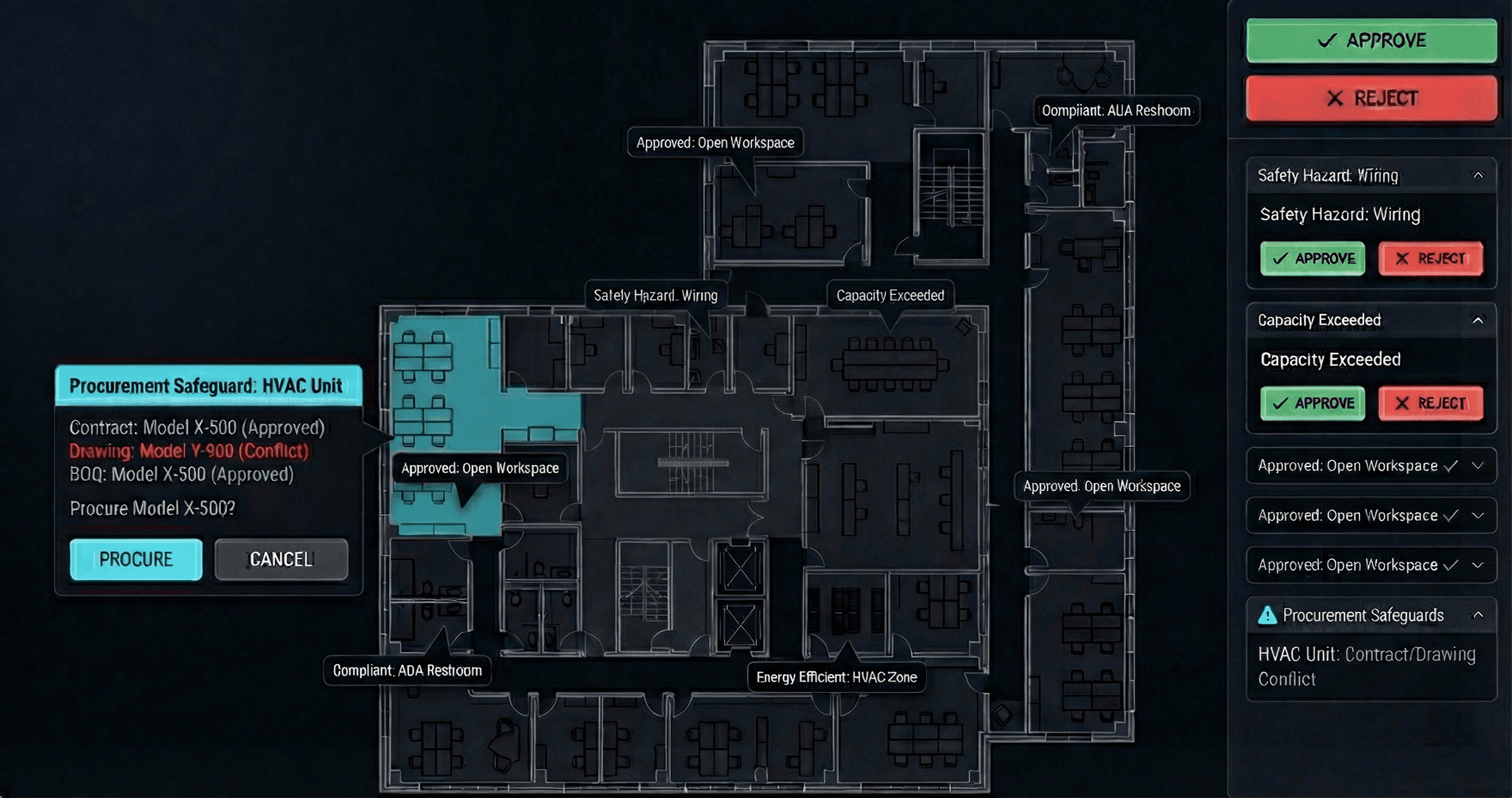
Procurement Safeguards
Bridge the gap between Design and the Buy.
Eliminate scope gaps and stop ordering from obsolete data. Procurement Safeguard connects your purchase orders directly to drawings, ensuring you only ever buy what is actually specified.
The most expensive mistakes happen at the handover. Designers change drawings. Commercial teams build tender packages. Often, these two processes happen in silos. By the time the Purchase Order is signed, the drawings have evolved — leading to scope gaps, incorrect quantities, and wrong specifications.
Version Control Chaos: Procurement teams quoting off Rev B when the Architects are on Rev D
Scope Creep: Missing items that exist in the model but weren’t captured in the Bill of Quantities
Spec Drift: Ordering materials that don’t match the latest technical performance requirements
You can’t afford to buy the wrong thing.
Dynamic Scope Verification
Stop manually counting PDF markups. Procurement Safeguard pulls quantities and specifications directly from CIM BUILD model elements. It automatically cross-checks your Line Items against the Design Model to ensure 100% scope coverage before you go to tender.
Change Impact Alerts
Design doesn’t stop just because you’re procuring. If a design change occurs after a package is created or when a drawing is updated, you will receive alerts on what changed:
“Warning: Wall Type changed in this scope.”
You catch the variation before the contract is signed — not after materials arrive on site.
Specification Locking
Ensure compliance from day one. The system validates that material codes and performance specs in your Purchase Order match approved technical submittals and IFC drawings. If a contractor substitutes a cheaper product, the discrepancy is flagged against the design baseline.
Value
Eliminate “Design Change” Variations
A huge percentage of variations occur because procurement scope didn’t match final construction drawings. By linking the two data sets, you close the loophole subcontractors use to claim extras.
Reduce Material Wastage
Precise, model-based quantification means you order exactly what’s needed — including accurate waste factors. Stop paying for over-ordering driven by conservative manual estimates.
Audit Trail & Accountability
Create an unbreakable digital thread. Every line item in your procurement package is linked to the specific design element it represents. If a dispute arises later, you have instant traceability of what was bought, why, and based on which drawing version.
SEE CIM IN ACTION
Bridge the gap between Design and the Buy.
Eliminate scope gaps and stop ordering from obsolete data. Procurement Safeguard connects your purchase orders directly to drawings, ensuring you only ever buy what is actually specified.
The most expensive mistakes happen at the handover. Designers change drawings. Commercial teams build tender packages. Often, these two processes happen in silos. By the time the Purchase Order is signed, the drawings have evolved — leading to scope gaps, incorrect quantities, and wrong specifications.
Version Control Chaos: Procurement teams quoting off Rev B when the Architects are on Rev D
Scope Creep: Missing items that exist in the model but weren’t captured in the Bill of Quantities
Spec Drift: Ordering materials that don’t match the latest technical performance requirements
You can’t afford to buy the wrong thing.
Dynamic Scope Verification
Stop manually counting PDF markups. Procurement Safeguard pulls quantities and specifications directly from CIM BUILD model elements. It automatically cross-checks your Line Items against the Design Model to ensure 100% scope coverage before you go to tender.
Change Impact Alerts
Design doesn’t stop just because you’re procuring. If a design change occurs after a package is created or when a drawing is updated, you will receive alerts on what changed:
“Warning: Wall Type changed in this scope.”
You catch the variation before the contract is signed — not after materials arrive on site.
Specification Locking
Ensure compliance from day one. The system validates that material codes and performance specs in your Purchase Order match approved technical submittals and IFC drawings. If a contractor substitutes a cheaper product, the discrepancy is flagged against the design baseline.
Value
Eliminate “Design Change” Variations
A huge percentage of variations occur because procurement scope didn’t match final construction drawings. By linking the two data sets, you close the loophole subcontractors use to claim extras.
Reduce Material Wastage
Precise, model-based quantification means you order exactly what’s needed — including accurate waste factors. Stop paying for over-ordering driven by conservative manual estimates.
Audit Trail & Accountability
Create an unbreakable digital thread. Every line item in your procurement package is linked to the specific design element it represents. If a dispute arises later, you have instant traceability of what was bought, why, and based on which drawing version.